AI Avatar: AI Headshots, DP
For Android
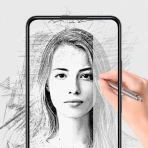
Creating a convincing profile image usually takes more work than people expect. I tested AI Avatar: AI Headshots, DP as an art and design app, and its main appeal is clear: it turns the idea of a studio-style portrait into something you can try from a phone. The app is aimed at AI avatars, headshots, social photos, dating profiles, and display pictures, so it sits somewhere between a portrait editor and a quick creative generator.
My overall impression is mixed but useful. When the source photo is suitable and the desired result is fairly conventional, the app can save time and offer ideas that would be difficult to create manually. It is less dependable when I want a precise likeness, a carefully controlled composition, or a result that works equally well for every person and every situation. I would recommend approaching it as a fast experimentation tool rather than a replacement for a professional photographer or a full image editor.
How the app feels to read and navigate
The first thing I noticed is that the product concept is easy to understand. It is not trying to be a general drawing suite with dozens of unrelated tools. The focus is on transforming portrait images into polished-looking variations, which makes the starting point less intimidating for someone who has never used an AI art app before.
That focused purpose matters for readability. A person opening the app because they need a new profile picture can think in practical terms: choose a suitable portrait, select the kind of result they want, and review the generated image. I found that easier to understand than a traditional editor where I would have to learn layers, masks, lighting controls, retouching brushes, and export settings before seeing anything useful.
At the same time, AI generation can make navigation feel less predictable than ordinary photo editing. In a conventional editor, moving a slider generally produces a visible and repeatable change. With an avatar generator, the result may shift in several ways at once. A change intended to affect clothing or mood can also influence the background, facial detail, or overall resemblance. That means the interface may be simple while the decision-making is not.
For a first attempt, I would keep the workflow narrow. I would begin with one clear portrait, decide what the image is for, and avoid changing several creative choices at once. This is a practical advantage for users who prefer a readable, low-clutter process: fewer simultaneous decisions make it easier to tell whether the output actually improved.
The app is free to install, which lowers the barrier to trying it. Its developer is Generative AI Magic Tools By Phot.AI, and the product has reached over a million installs. The average rating is 3.2, so I would not treat the large audience as proof that every user will have a smooth experience. It is better understood as evidence that the concept attracts people, while the middling rating suggests that expectations and results do not always line up.
The current version is 2.1.38.0, and it runs on Android 7.0 or later. That is helpful for people using older Android phones, although compatibility alone does not guarantee that generation will feel equally comfortable on every device. Screen size, processing speed, and the quality of the original camera image can all affect how pleasant the experience is.
Choosing images that make the process easier
The most important preparation step is choosing a source image that gives the system a fair chance. I would use a sharp, front-facing or slightly angled portrait with the face visible, reasonably even lighting, and minimal obstruction. A dark image, a strong filter, sunglasses, a cropped forehead, or several people in the frame can make the result harder to judge.
This is not just a quality tip; it also improves accessibility. Someone who has difficulty distinguishing subtle facial changes will benefit from starting with a clean image and comparing outputs at a larger scale. If the original photo is already confusing or low contrast, it becomes difficult to tell whether an odd result came from the app or from the source material.
I also recommend keeping the original photo untouched. AI portrait tools can produce attractive images that still contain small identity errors, so I would never replace the source file with an edited result. Saving a few candidate versions with simple names such as “profile,” “casual,” and “professional” makes later selection easier, especially for users who find dense visual galleries tiring.
Motor and sensory considerations during everyday use
For users with limited fine-motor control, a focused portrait workflow may be more manageable than detailed retouching. There is less need for precise brushwork, repeated tapping on tiny controls, or tracing around hair and clothing. That is one of the app’s strongest potential advantages: it can move some of the difficult manual work into an automated process.
You may also like

Amazon Kindle: Revolutionizing Digital Reading

Why OLX: Compras Online e Vendas Captivates Shoppers Worldwide

Unpacking the Strategy of Yalla Ludo's Jackaroo Mode

Why eBay's Mobile App Stands Out in Online Shopping

How Fishdom's Puzzle Mechanics Transform Your Aquarium Experience

Block Blast! The Perfect Puzzle for Busy Lives
However, automation does not remove every motor challenge. Selecting the right image, reviewing several results, and returning to a previous choice can still require accurate tapping and visual tracking. If the interface presents multiple small thumbnails or controls, a person with tremors or reduced dexterity may need to slow down and inspect each option rather than making quick selections.
For people with low vision, the practical test is not only whether text is readable. The generated image itself needs to be judged. I would enlarge portraits before deciding whether facial features, hair edges, glasses, and skin texture look natural. A result can appear excellent as a small thumbnail while showing distracting artifacts when opened more closely.
Users who are sensitive to visual intensity may also prefer a restrained workflow. Highly stylized portraits can include dramatic lighting, vivid colors, or busy backgrounds, and those choices may make an image harder to interpret. I found it more useful to begin with a realistic headshot goal and only move toward stronger artistic changes after confirming that the face still looked like the intended person.
People with hearing loss are unlikely to need spoken guidance for the central task, since the value of the app is visual. Still, any app that relies on temporary messages, sound cues, or visually brief status changes can be less comfortable for someone who cannot monitor every signal. I would pay attention to whether a generation has completed before moving away from the screen, rather than assuming that a finished-looking preview is ready to use.
One non-obvious trade-off is that a more polished image can be less personally recognizable. Smooth skin, altered proportions, and fashionable styling may improve the impression of a portrait while weakening the connection to the real person. For a dating profile or professional identity, that matters more than it would for a playful social avatar. I would compare the generated face with the original at normal viewing size and ask whether a friend would still recognize it immediately.
Using it in different real-life contexts
The app makes the most sense when I need several visual options quickly. Suppose I am updating a work profile but do not have time for a photo session. I could start with a clear portrait, create a few more polished variations, and choose the one that looks friendly without becoming overly artificial. The benefit is not only speed; the process can reveal which background, crop, or level of formality suits the platform.
For a social account, I would be more willing to experiment. A stylized avatar can communicate personality, and the consequences of an imperfect background or slightly unusual expression are usually smaller. The app is also useful when I want a consistent visual theme across several profiles, although I would still check each result separately instead of assuming that one successful image guarantees equally good outputs.
Dating profiles require more caution. A heavily transformed image may attract attention but create an expectation that the real person cannot match. I would use the app for a tasteful improvement or an additional creative image, not as the only representation of myself. Keeping recognizable features and avoiding dramatic changes is both more honest and more practical.
For a small business owner, freelancer, or student, an AI headshot can be a convenient temporary solution when a formal portrait is unavailable. It may work well for a presentation, an internal directory, or a low-stakes social page. I would be more careful with official identification, applications, credentials, or any setting where an image must represent a person accurately rather than creatively.
The app can also help users who feel uncomfortable in front of a camera. Instead of arranging a complete photoshoot, they can test different visual directions from one existing portrait. That can reduce the social and logistical pressure of posing. The limitation is that the app cannot fix every underlying problem: if the source expression feels uncomfortable or the face is partly hidden, the generated version may inherit that awkwardness in a different form.
Where it differs from ordinary photo editors
A traditional photo editor gives me control. I can adjust exposure, crop precisely, remove a blemish, or change a background in a predictable way. AI Avatar: AI Headshots, DP offers a different bargain: less detailed control in exchange for faster transformation and more imaginative variations. That is attractive when I want inspiration or a finished-looking concept without learning a complex editing workflow.
The trade-off becomes obvious when accuracy matters. A manual editor is usually better for correcting one specific issue while preserving everything else. This app is better suited to asking for a broader visual change and accepting that several elements may move together. If I need the exact same face, exact clothing, exact framing, and exact background with only one small adjustment, I would choose a conventional editor instead.
It also differs from a real photoshoot. A photographer can direct posture, expression, lighting, and clothing in response to the person in front of the camera. An AI generator can create a convincing appearance from an existing image, but it does not provide that human feedback or guarantee that the result represents how someone actually looks. For an important professional milestone, the time saved may not justify the loss of control.
Compared with a basic avatar maker, this app is more relevant when I want a portrait that resembles a headshot rather than a cartoon character. That makes it useful for profile contexts, but it also raises the standard for realism. Small errors that I would forgive in a playful illustration become much more noticeable when the image is supposed to look like a polished photograph.
Costs, expectations, and practical limits
The app is free, but optional purchases range from $2.99 to $149.99 per item. That is a wide range, so I would explore the free experience carefully before spending money. The key question is not whether one generated portrait looks attractive; it is whether the available results consistently meet the purpose I have in mind.
I would also avoid treating a single successful output as proof that a paid option will solve every problem. AI portraits can vary from one attempt to another, and a purchase may feel disappointing if the main issue is the source photo, the requested style, or the need for exact identity preservation. My advice is to decide the use case first, test with realistic expectations, and only then consider an in-app purchase.
The Teen content rating is another reason I would think about context. The app is not something I would hand to a child without supervision simply because it creates profile images. Teenagers may use it for social identity, dating-related presentation, or appearance experimentation, areas where pressure and comparison can become uncomfortable. A generated image should remain a creative option, not a measure of personal attractiveness or social value.
Privacy is also a sensible consideration whenever personal portraits are uploaded to an AI service. I would avoid using photographs of other people without their permission, especially children, coworkers, or strangers. I would also think twice before submitting an image that contains private documents, visible addresses, or other people in the background. These are good habits for any portrait-generation app, and they are particularly important when the output may be shared publicly.
Remaining barriers for inclusive use
The biggest barrier is not necessarily a button or menu; it is the visual judgment the app asks the user to make. To use it well, I need to recognize whether the face still looks natural, whether the lighting is believable, and whether the image communicates the right level of formality. That can be difficult for users with visual impairments, color-vision differences, facial-recognition difficulties, or limited experience evaluating portraits.
Another barrier is cultural and personal fit. A result may look polished according to common portrait conventions while still feeling unlike the user’s identity, clothing preferences, hairstyle, skin tone, age, or expression. I would not assume that a more standardized headshot is automatically more inclusive. The best output is the one that respects the person’s intended presentation, not merely the one that looks most conventionally professional.
There is also a risk of over-editing features connected to disability, age, or individual appearance. If the system changes mobility aids, facial differences, scars, hair texture, or other meaningful details, the image may become less truthful even if it appears smoother. For a personal avatar, that may be a deliberate artistic choice. For a professional or dating profile, I would consider whether the change creates an unfair expectation.
People working in low-connectivity situations may find any AI generation workflow inconvenient if it depends on processing beyond the phone. I would plan to create images when I have a stable connection and enough time to review them, rather than relying on the app immediately before an appointment or deadline. This is a situational limitation that matters more for travelers, rural users, and anyone with a restricted data plan.
Finally, the app is not the right choice for users who need transparent, repeatable editing. If I must document every alteration, preserve exact proportions, or meet a strict brand template, I would use a professional editor or a photographer. The automated approach is valuable precisely because it makes creative decisions for me, and that is also why it cannot replace a workflow built around full control.
My inclusive verdict
I see AI Avatar: AI Headshots, DP as a convenient entry point for people who want portrait ideas without mastering a complicated editor. Its focused purpose can make the first step approachable, and it may reduce the need for precise manual retouching. For social avatars, casual profile updates, and temporary professional images, I can see genuine value in trying it.
My recommendation comes with a clear condition: use it as an assistive creative shortcut, not as an authority on how a person should look. Start with a clean portrait, make one creative decision at a time, inspect the face at a useful size, and keep the original image. Those habits make the experience more readable and reduce the chance of accepting an attractive but misleading result.
I would recommend it to users who value speed, enjoy experimenting, and can tolerate some unpredictability. I would skip it when exact likeness, strict privacy requirements, formal identity use, or detailed manual control is the priority. The free entry point makes testing reasonable, but the in-app purchase range means I would judge the results carefully before paying.
In the end, the app works best when accessibility means reducing effort and opening creative possibilities, while the user remains in control of the final choice. The strongest result is not the most dramatic avatar; it is the image that remains recognizable, comfortable, and appropriate for the person and situation.
AI Avatar: AI Headshots, DP is available for Android users on compatible devices, with a Teen age rating and a free starting point. I would treat its 3.2 average from around 9.9 thousand ratings as a reason to keep expectations balanced: there is enough here to explore, but the experience deserves a careful trial rather than an automatic commitment.
Pros
- Creates polished AI headshots without needing a professional photographer.
- Offers multiple styles suitable for profiles
- portfolios
- and social networks.
- Simple interface makes avatar generation accessible to beginners.
- Processes photos quickly compared with traditional editing services.
- Useful for experimenting with different looks before updating a profile.
Cons
- Results can vary significantly depending on the quality of uploaded photos.
- Some generated faces may look artificial or differ from your appearance.
- The best styles and features may require a paid subscription or credits.
- Uploading personal photos may raise privacy concerns for some users.
- Repeated generations can consume credits quickly when refining a result.
FAQ
What is AI Avatar: AI Headshots, DP, and what can it do?
AI Avatar: AI Headshots, DP is designed to turn your selfies into polished profile pictures, professional-looking headshots, and creative avatar images. After uploading a suitable photo, the app uses artificial intelligence to generate different visual styles, backgrounds, and portrait variations. It can be useful for social media profiles, messaging apps, resumes, dating profiles, or simply experimenting with new looks.
How should I take or choose photos for the best results?
For more accurate and natural-looking results, choose clear, high-resolution photos where your face is visible and well lit. Front-facing images usually work better than heavily angled selfies, group photos, or pictures with sunglasses, hats, and strong filters. Uploading several photos with different expressions can also help the app understand your facial features and produce more consistent AI headshots.
Is AI Avatar: AI Headshots, DP free to use?
The app may offer free features, trial generations, or a limited number of avatar styles, while additional designs and unlimited access can require in-app purchases or a subscription. Pricing, available packages, and trial conditions can vary depending on your device, country, and the current version of the application. Check the purchase screen carefully before confirming any payment.
Are my photos and personal data safe when using the app?
Because the service needs to process your uploaded images, you should review its privacy policy and permission requests before using it. Pay attention to how photos are stored, whether they are sent to third-party servers, how long generated images are retained, and whether you can request deletion. Avoid uploading sensitive images if you are uncomfortable with cloud-based processing.
Can I use the generated AI headshots for professional or commercial purposes?
Generated portraits can generally be used for personal profiles and social media, but professional or commercial use may depend on the app’s terms, subscription plan, image licensing, and the source photos you provide. Before using an avatar for advertising, branding, business profiles, or paid projects, confirm whether commercial rights are included. Also review each image carefully for unrealistic facial details or visual errors.