Solitaire: Big Card Games
For Android
I approached Solitaire: Big Card Games as the kind of game I could open for a few quiet minutes rather than as a demanding card challenge. That first impression still holds: it is a straightforward solitaire game from Card Games, Inc, built around familiar play and easy reading. The large-card focus makes sense for players who want less visual strain, and the calm presentation suits a short break, a relaxed evening, or a simple daily routine.
What makes it worth considering is not a complicated collection of systems, but how little effort it takes to begin. I do not need to learn a new card game before playing, and the free price removes the usual hesitation about trying it. At the same time, this simplicity is also the main thing to evaluate carefully. If you want deep progression, competitive events, or a large variety of card games, this experience may feel narrow. If you want familiar solitaire with a comfortable layout, it is much easier to recommend.
How a normal session feels from the first deal
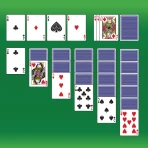
The baseline workflow is pleasantly uncomplicated. I open the game, start a solitaire hand, and concentrate on arranging cards rather than navigating through layers of menus. That matters on a phone because solitaire works best when the game gets out of the way. A small pause, a waiting room, or a few spare minutes can become a complete session without demanding much attention.
The card-game format also makes the app approachable for different levels of experience. Someone who already knows classic solitaire can settle in immediately, while a less experienced player can learn by watching how the tableau, stock, waste, and foundation interact. I would still advise a new player to take the first few hands slowly. The value is in recognizing which moves open useful cards and which moves merely create temporary movement.
The large-card design is especially helpful when I play on a smaller phone or when the screen is not close to my face. It reduces the need to squint at suit symbols and ranks, which is a practical advantage rather than a decorative one. The Everyone age rating also reflects the accessible nature of the game: there is no intimidating theme or complicated presentation standing between the player and the cards.
A realistic use case is a quiet morning routine. I can play one hand while waiting for coffee, stop when the hand ends, and return later without needing to remember a story or a long-term objective. It also works well for an older relative who enjoys traditional card games but finds dense interfaces tiring. I would introduce it by showing the basic movement of cards, then let the player develop a rhythm at their own pace.
There is a useful distinction between relaxing and effortless. Solitaire still asks me to make decisions, and a poor move can leave a hand awkward or unwinnable. That small amount of concentration is part of the appeal. I can use it as a mental reset, but I would not describe it as background entertainment that plays itself.
What I would do before settling into a routine
My first practical step would be to play several hands without trying to rush. I look for cards buried under the tableau, consider whether moving a sequence exposes something valuable, and avoid emptying a column just because an empty space is available. This habit is more useful than chasing quick moves. In solitaire, a move that looks active is not automatically a good move.
I also pay attention to how the game responds to taps and drags. On a touchscreen, the difference between a comfortable gesture and an awkward one can decide whether a relaxing session stays relaxing. I prefer to use the simplest interaction the game accepts consistently, especially when moving a sequence. If a card is easy to select with a tap, that can be less tiring than repeatedly dragging across the screen.
For a beginner, I would suggest a repeatable order: inspect the tableau, check the available stock move, expose hidden cards where possible, and only then build longer sequences. This is not a special feature of the app; it is a practical way to play this particular style of solitaire with fewer regrets. The large-card presentation helps because I can scan the layout quickly before committing to a move.
Settings and presentation choices worth checking
Before judging the game after one hand, I would spend a moment checking the available settings and presentation controls. The most important question is whether the visual arrangement feels comfortable on your device. A large-card game should be judged from the way it reads in your own hand, under your own lighting, not only from screenshots or a store summary.
I would also check how the game handles movement and accidental touches. If there are choices for tap-based play, drag-based play, sound, or visual presentation, I would choose the combination that makes mistakes less likely. I am careful not to assume every control is available on every device or version, but the general principle is sound: a solitaire game becomes better when the interface matches the player’s hands and eyesight.
You may also like

Amazon Kindle: Revolutionizing Digital Reading

Why OLX: Compras Online e Vendas Captivates Shoppers Worldwide

Unpacking the Strategy of Yalla Ludo's Jackaroo Mode

Why eBay's Mobile App Stands Out in Online Shopping

How Fishdom's Puzzle Mechanics Transform Your Aquarium Experience

Block Blast! The Perfect Puzzle for Busy Lives
Sound is another setting I would treat as personal rather than essential. Some players like small sounds to confirm a move; others find them distracting when playing in a waiting room or beside someone who is resting. I normally begin quietly and enable audio only if it adds something to the session. A calm card game should not force me to make the environment noisier than I want.
For an older player, I would make the screen comfortable before discussing strategy. Increase the device’s general text size if needed, clean the screen, and play with the phone held steadily rather than trying to manage cards while walking. The game’s large-card approach helps, but it cannot compensate for glare, poor lighting, or a display that is too small for the player’s preference.
One useful habit is to change only one setting at a time. If the interface feels better after several changes, it becomes difficult to know which adjustment helped. I prefer to test card size or interaction first, then sound, and then any remaining presentation option. That makes the setup repeatable when moving between devices or helping another person configure the game.
Faster patterns that improve ordinary play
Experienced solitaire players rarely move quickly just for the sake of speed. They move quickly because they recognize patterns. In this game, I get better results when I scan for hidden-card opportunities before building attractive but unhelpful sequences. Revealing a face-down card often creates more possibilities than rearranging cards that are already visible.
I also avoid treating the stock as a source of random rescue cards. I inspect what is available and think about how using one card changes the next decision. When several moves are possible, I favor the one that increases future choices. That usually means exposing a covered card, preserving a useful empty column, or keeping a flexible sequence available rather than locking everything into one arrangement.
Another repeatable pattern is to delay sending a card to the foundation when that card could still help in the tableau. Moving cards upward feels like progress, but an intermediate card can sometimes be more useful for alternating colors or extending a sequence. I do not follow this rule blindly; when a foundation move clearly opens the layout or is no longer useful elsewhere, I make it. The important point is to consider flexibility, not just visible progress.
Empty columns deserve similar care. An empty space is powerful because it can accept a king-led sequence, but filling it immediately may remove the chance to use it strategically. I ask myself whether the move creates access to a buried card or merely makes the board look tidier. This small pause is one of the easiest ways to replace impulsive play with a more reliable routine.
For short sessions, I recommend a two-pass approach. On the first pass, I identify safe moves that reveal information. On the second, I commit to the sequence that creates the most room. This keeps the game relaxing while still giving the brain something meaningful to work on. It is also a better fit for a phone than trying to calculate every possibility several moves ahead.
When I am playing beside someone who is learning, I explain the reason behind a move instead of simply pointing to the card. “This exposes a hidden card” is more useful than “move this here.” That teaching style makes the game feel less like a puzzle with secret rules and more like a familiar activity that rewards observation.
Where the simple design reaches its limits
The same focus that makes the game approachable can make it feel limited for players who want more variety. This is a solitaire title, not a broad card-game collection. If your ideal app includes several named variants, elaborate challenges, tournaments, social competition, or a strong progression system, I would look at alternatives designed around those priorities instead.
I also would not choose it as my main option if I need a highly competitive experience. Solitaire is naturally personal, and this kind of presentation is better suited to concentration and relaxation than to comparing performance with a large community. Players who enjoy leaderboards, daily competitive tasks, or detailed statistics may prefer a more feature-heavy alternative, even if that alternative feels busier.
There is a trade-off between readability and information density. Large cards are easier to see, but a spacious layout can mean less of the board fits comfortably on a small screen. If you like surveying every card at once, you may need to adjust your grip or zoom expectations. I would test the game on the exact phone that will be used most often rather than assuming a comfortable tablet experience will translate perfectly.
Another limitation is the nature of solitaire itself. A thoughtful decision does not guarantee a satisfying result, and some hands can become frustrating when the useful card is buried beyond practical reach. That is not a flaw unique to this app, but it matters when deciding whether the game suits you. I enjoy the process more when I accept that not every hand will resolve cleanly.
The current version is 1.3.2, and the game supports devices running Android 6.0 or later. That makes it relevant for people using older Android hardware, although the actual comfort of play will still depend on screen size, responsiveness, and display quality. I would check compatibility on the intended device before planning to give it to someone who relies on an older phone.
Who will enjoy it, and who should skip it
I think this is a strong match for players who want familiar solitaire without a steep learning curve. It suits people who enjoy quiet puzzles, older players who value readable cards, and anyone looking for a small routine that can be paused naturally. The free price makes experimentation easy, and the Everyone rating means it can fit a shared household device without feeling aimed at a narrow audience.
It is also a reasonable choice for someone returning to solitaire after a long break. The game does not ask me to understand a fictional world, manage resources, or memorize a large control scheme. I can focus on the cards and rebuild confidence through ordinary hands. For that audience, simplicity is a feature rather than a missing extra.
I would skip it if my priority is constant novelty. Players who quickly tire of one familiar solitaire format may find the experience repetitive, especially if they expect new modes or a strong sense of progression. I would also skip it for children seeking fast action or for adults who want a multiplayer card room. The calm pace is intentional, so it will not satisfy every definition of fun.
The app’s reception suggests that many players find the basic experience appealing: it has an average rating of 4.6 from around 3.9 thousand ratings, with over 500 thousand installs. I treat those figures as a sign of broad interest rather than a guarantee that every player will enjoy the same pace. My own recommendation depends more on whether you want readable, traditional solitaire than on popularity alone.
My verdict after making it part of a routine
Solitaire: Big Card Games succeeds by keeping its central activity clear. I can open it, understand the board, and settle into a hand without learning a complicated system. The large-card emphasis is genuinely useful, especially for players who find small suits and ranks tiring. Card Games, Inc has aimed at an accessible version of a familiar game, and that focus gives it a clear identity.
My best advice is to treat it as a dependable quiet-game companion, not as an endless entertainment platform. Check the presentation and interaction settings, establish a comfortable way to handle cards, and use a deliberate scan before making quick moves. Those habits make the experience smoother and reveal more of the strategic side without turning a relaxing session into work.
For me, the deciding question is simple: do you want a readable solitaire game that fits naturally into small breaks? If yes, I would recommend trying it. If you need variety, competition, or elaborate long-term goals, choose a broader card app instead. Its strongest quality is the balance between familiar rules and low-friction play, and its main weakness is that the same restraint may leave demanding players wanting more.
As a free card game for Everyone, it is easy to test without much commitment. I would especially suggest it to a friend who wants something calm, recognizable, and comfortable on a phone. I would set expectations honestly, though: the satisfaction comes from improving your decisions and enjoying the rhythm of the deal, not from unlocking a huge world of content. Used on those terms, it is a pleasant and practical solitaire choice.
Pros
- Large cards make suits and numbers easy to see.
- Includes several solitaire variations beyond classic Klondike.
- Simple controls are comfortable on phones and tablets.
- Offline play is useful when no internet connection is available.
- Short games fit well into quick breaks or commutes.
Cons
- Frequent ads may interrupt the flow between games.
- Some features and themes may require in-app purchases.
- Random deals can occasionally feel repetitive over time.
- Limited customization may disappoint players seeking deeper options.
- Battery use can increase during longer play sessions.
FAQ
What is Solitaire: Big Card Games, and how is it played?
Solitaire: Big Card Games is a mobile card game focused on classic solitaire gameplay, especially Klondike-style layouts. The objective is to organize cards into foundation piles by suit, starting with the Ace and continuing in ascending order. Cards can usually be moved between tableau columns in descending order with alternating colors, while the large card design makes the board easier to read on smaller screens.
Is Solitaire: Big Card Games suitable for beginners and older players?
Yes, the game is designed to be approachable for beginners, casual players, and anyone who prefers clearly visible cards. Its large-card presentation can be particularly helpful for users with limited eyesight or those playing on a smaller phone. Familiar rules, straightforward controls, and the ability to undo moves make it easier to learn without feeling overwhelmed by complicated menus or advanced mechanics.
Can I play Solitaire: Big Card Games without an internet connection?
Solitaire games are generally intended to be playable offline, which makes them convenient for flights, commutes, waiting rooms, or areas with unreliable service. However, some features may still require an internet connection, including advertisements, cloud-related services, updates, leaderboards, or in-app purchases. It is best to test the game once after installation before relying on it completely while offline.
Does Solitaire: Big Card Games contain advertisements or in-app purchases?
The game may use advertising or optional purchases as part of its free-to-download model. Depending on the version and device, you could encounter banner ads, full-screen ads, or promotional offers after completing a deal. Some editions may provide a paid option to remove advertisements or unlock additional features. Check the store listing and purchase screen carefully before confirming any transaction.
What should I check before downloading Solitaire: Big Card Games?
Before downloading, check that your Android or iOS device meets the required operating-system version and has enough available storage. You should also review the current permissions, privacy information, advertising policy, and recent user feedback, since these can change with updates. Confirm whether your preferred features, such as offline play, statistics, themes, hints, or ad removal, are included in the version available in your region.