Bolt for Tesla - Tasker Plugin
Crazydog Auto & Vehicles

- 27.00 Reviews
- 4.8
- Version
- 7.0.2
- Installs
- 5.00K
Screenshots
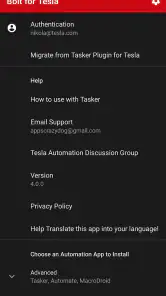
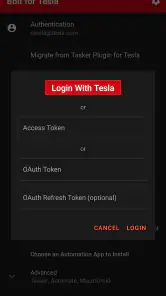
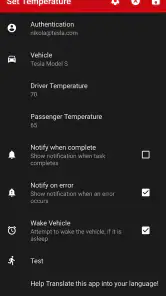
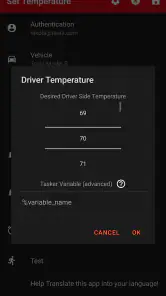
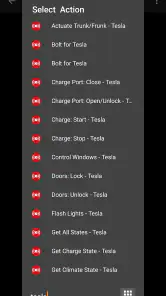
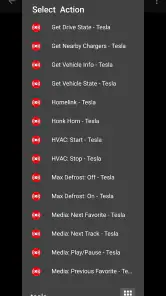
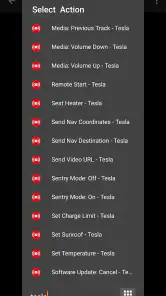
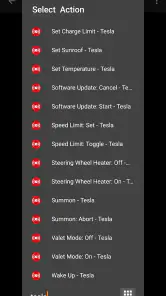
- Key strengths of the app—features, ease of use, or overall experience.
- Seamless integration with Tesla vehicles
- Automates Tesla functions via Tasker
- User-friendly interface
- Enhances Tesla's capabilities
- Supports custom automation scripts
- Possible downsides—like bugs, missing features, or performance issues.
- Requires Tasker app installed
- Limited to Tesla owners
- Complex setup for non-tech users
- Some features need premium version
- May drain phone battery
If you've ever wished for more seamless control over your Tesla with just a few taps on your phone, the Bolt for Tesla - Tasker Plugin might just be the app for you. This nifty little tool allows Tesla owners to automate a variety of functions, adding a layer of convenience that can turn your futuristic car experience up a notch. Let's dive into what makes this app a must-have for Tesla enthusiasts.
Get to Know Bolt for Tesla
Bolt for Tesla is not just another app on the Play Store; it's an extension of the Tasker app, which is well-known for its automation capabilities on Android devices. If you're someone who loves to tinker with your device settings and create automated tasks, Bolt for Tesla brings that same magic to your car. It allows you to automate almost any function of your Tesla, from climate control to initiating charging sessions, all without needing to physically interact with the car.
Setting Up
Getting started with Bolt for Tesla is relatively straightforward. First, you'll need to have the Tasker app installed on your Android device. Once you have that set up, downloading Bolt for Tesla is a breeze. The plugin integrates smoothly with Tasker, allowing you to start creating tasks right away. However, note that you'll need to have your Tesla account credentials handy for the initial setup.
The user interface is clean and intuitive, making it easy even for those who aren't particularly tech-savvy. You can create tasks that are triggered by specific conditions, such as time of day, location, or even your phone's battery level. Imagine your Tesla cooling down the interior as you leave work every day at 5 PM, or starting to charge when your phone hits 10% battery—it's all possible with a few simple taps.
Features That Stand Out
One of the standout features of the Bolt for Tesla plugin is its ability to integrate with voice commands. If you have Google Assistant set up, you can control your Tesla with just your voice. This feature is particularly handy if you're juggling grocery bags or dealing with the kids and can't reach your phone.
The app also supports geofencing, which means you can set specific tasks to activate when you enter or leave certain areas. This is perfect for ensuring that your car is always ready to go when you are, without having to remember to manually activate anything.
Why You Might Love It
As someone who's always on the go, the automation capabilities that Bolt for Tesla offers can save you a ton of time and hassle. It turns your Tesla experience from "I need to remember to do this" to "Oh, it's already done," which is a game-changer. Plus, there's a certain satisfaction in knowing your car is handling tasks on its own, almost like a trusty sidekick.
Overall, the Bolt for Tesla - Tasker Plugin brings a host of smart features to your fingertips, making your Tesla ownership experience even more enjoyable. Whether you're a tech enthusiast looking to automate every aspect of your life, or just someone who appreciates the convenience of automation, this app is bound to impress.
Give it a try, and you might just find yourself wondering how you ever managed without it.